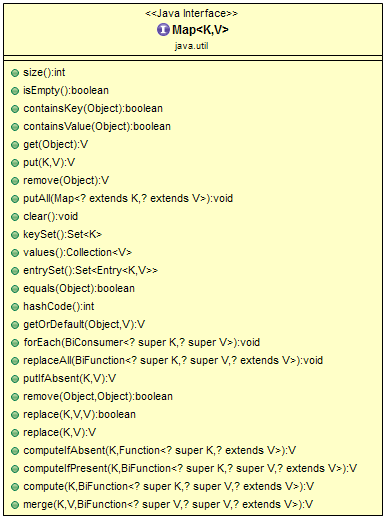
Key points about the Map interface
Mapis part of the Java Collections Framework, but it doesn’t inherit theCollectioninterface.- A
Mapcannot contain duplicate keys — each key maps to at most one value. It models the mathematical function abstraction. - Each key-value pair of the map is stored as a
Map.Entryobject — an inner interface ofMap. - The Java platform has three general-purpose
Mapimplementations:HashMap,TreeMap, andLinkedHashMap. - Order of elements is implementation-dependent:
HashMapdoesn’t maintain any order,LinkedHashMapmaintains insertion order, andTreeMaporders elements according to the suppliedComparator. Mapprovides three methods that let its contents be viewed as a set of keys (keySet()), a collection of values (values()), or a set of key-value mappings (entrySet()).
HashMap implementation of a Map
public class CreateHashMapExample {    public static void main(String[] args) {        // Creating a HashMap        Map<String, Integer> numberMapping = new HashMap<>();
        // Adding key-value pairs to a HashMap        numberMapping.put("One", 1);        numberMapping.put("Two", 2);        numberMapping.put("Three", 3);
        // Add a new key-value pair only if the key does not exist, or is mapped to null        numberMapping.putIfAbsent("Four", 4);
        // Access element by its key        numberMapping.get("One");
        // Remove element by its key        numberMapping.remove("Two");
        // Getting the size of the map        int size = numberMapping.size();
        System.out.println(numberMapping);    }}
Looping through a HashMap
There are different ways to loop through a HashMap:
- Using
entrySet()and a for-each loop - Using
keySet()and a for-each loop - Using
values()and a for-each loop - Using an
Iterator - Using Java 8’s
forEachmethod
public class Main {    public static void main(String[] args) {        // Creating a HashMap        HashMap<String, String> map = new HashMap<>();        map.put("Apple", "Red");        map.put("Orange", "Orange");        map.put("Banana", "Yellow");
        // Using entrySet and a for-each loop        System.out.println("Using entrySet and a for-each loop:");        for (Map.Entry<String, String> entry : map.entrySet()) {            System.out.println("Key = " + entry.getKey() + ", Value = " + entry.getValue());        }        System.out.println();
        // Using keySet and a for-each loop        System.out.println("Using keySet and a for-each loop:");        for (String key : map.keySet()) {            System.out.println("Key = " + key + ", Value = " + map.get(key));        }        System.out.println();
        // Using values and a for-each loop        System.out.println("Using values and a for-each loop:");        for (String value : map.values()) {            System.out.println("Value = " + value);        }        System.out.println();
        // Using an Iterator        System.out.println("Using an Iterator:");        Iterator<Map.Entry<String, String>> iterator = map.entrySet().iterator();        while (iterator.hasNext()) {            Map.Entry<String, String> entry = iterator.next();            System.out.println("Key = " + entry.getKey() + ", Value = " + entry.getValue());        }        System.out.println();
        // Using Java 8's forEach method        System.out.println("Using Java 8's forEach method:");        map.forEach((key, value) -> System.out.println("Key = " + key + ", Value = " + value));    }}
Output of the loops
Using entrySet and a for-each loop:Key = Apple, Value = RedKey = Orange, Value = OrangeKey = Banana, Value = Yellow
Using keySet and a for-each loop:Key = Apple, Value = RedKey = Orange, Value = OrangeKey = Banana, Value = Yellow
Using values and a for-each loop:Value = RedValue = OrangeValue = Yellow
Using an Iterator:Key = Apple, Value = RedKey = Orange, Value = OrangeKey = Banana, Value = Yellow
Using Java 8's forEach method:Key = Apple, Value = RedKey = Orange, Value = OrangeKey = Banana, Value = Yellow
Methods available on the Map interface: